AI SRE agents on Kubernetes: read-only access, no Secrets, no exec
An AI SRE agent can often find the root cause of a broken Kubernetes deployment in under a minute. If you hand it a shell and an admin kubeconfig to do that, it will also create pods, exec into containers and pull Secrets into its context along the way, because those are reasonable steps for a debugger and nothing told it otherwise. The fix is not a better prompt. It is an identity that cannot do those things, and a tool interface that gives the agent the context it was reaching for.
NubiCode is a nearshore cloud-native and AI infrastructure engineering company. We build and run AI agent platforms for US teams, including a scaled MCP gateway on Kubernetes for autonomous agents and an agent platform held at zero config drift with ArgoCD. This post is the access pattern we use when an agent needs to look at a production cluster: read-only identity, read-only tools, one front door, and Git for every change.
Why this matters now
- On October 21, 2026, the CNCF blog published a member post on evaluating AI SREs that ran Claude Code against 50 injected faults on an Amazon EKS cluster, once with a shell and kubectl and once with read-only MCP tools. Accuracy was nearly identical (45 vs. 46 correct), but mean time to an answer dropped from 191 to 64 seconds with the tools. In the shell runs, the agent launched its own pods on 13 faults, used exec, cp, port-forward or debug on 21, and pulled Secret data into its context on 4. The author sells the MCP server used in the test and says so; the governance numbers are the part worth keeping.
- containers/kubernetes-mcp-server, an Apache-2.0 server that talks to the Kubernetes API directly instead of wrapping kubectl, shipped v0.0.69 on October 23, 2026, with a
read_onlymode, tool allowlists, denied resource types and a Helm chart. - KubeCon + CloudNativeCon North America runs November 9 to 12 in Salt Lake City. If your team comes back from it with an AI SRE trial, decide the access model before the trial starts.
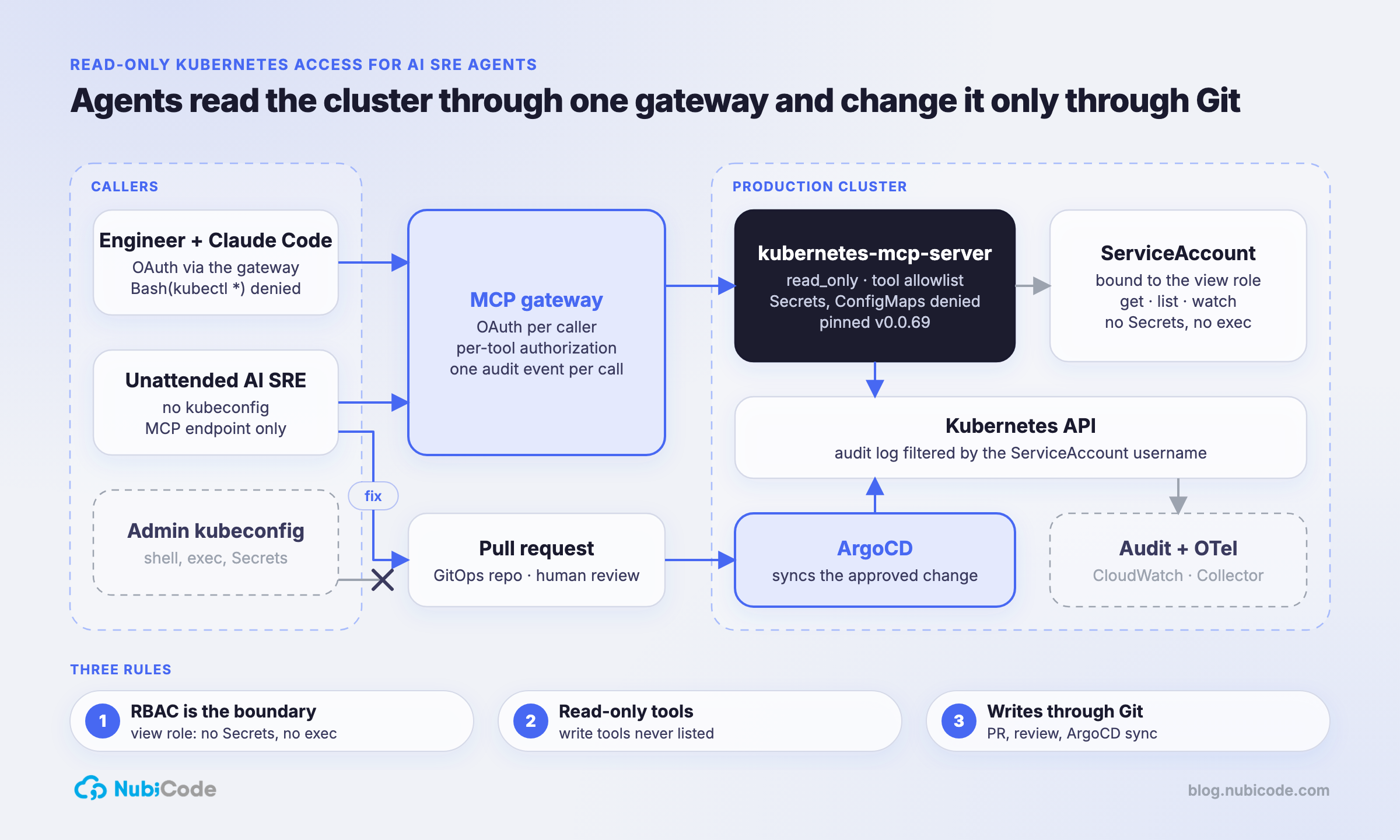
What does an AI SRE agent actually need from the cluster?
Diagnosis is reading: pod status, events, logs, rollout history, resource specs and recent changes. None of it needs create, exec or Secrets. So the design starts from the identity and works outward:
- Kubernetes RBAC: a ServiceAccount bound to the built-in
viewClusterRole. Stops writes, exec, port-forward and Secret reads. - MCP server:
read_only, a tool allowlist and denied resource types. Write tools never appear intools/list. - MCP gateway: OAuth, per-tool authorization and a per-call audit log. Stops anonymous callers and unlogged reads.
- Network: the server is reachable only from the gateway. Stops anyone bypassing the gateway from inside the cluster.
- GitOps: fixes are pull requests that ArgoCD applies. Stops an agent changing production directly.
RBAC is the boundary. Everything above it is defense in depth and a better experience for the model.
Step 1: bind a ServiceAccount to the view role
Kubernetes ships a user-facing view ClusterRole that allows read-only access to most objects and, by design, does not allow viewing Secrets, roles or role bindings. The docs give the reason directly: reading Secrets exposes ServiceAccount credentials, which is a form of privilege escalation. That is the right baseline. Don’t write a custom “read-only” role from scratch; many of them grant get on secrets because someone needed it once.
The Helm chart in step 2 creates the ServiceAccount and the binding. Once it is installed, verify what the identity can do instead of trusting the name:
SA=system:serviceaccount:mcp:kubernetes-mcp-server

kubectl auth can-i get secrets --as="$SA" -A                          # no
kubectl auth can-i create pods --as="$SA" -A                          # no
kubectl auth can-i create pods --subresource=exec --as="$SA" -A       # no
kubectl auth can-i create pods --subresource=portforward --as="$SA" -A  # no
kubectl auth can-i get pods --subresource=log --as="$SA" -A           # yes
kubectl auth can-i --list --as="$SA" -n payments
Put these checks in CI next to the chart. If a future aggregated ClusterRole quietly adds a permission to view, the pipeline tells you before an agent finds it.
Step 2: run a read-only MCP server in the cluster
We deploy kubernetes-mcp-server from its Helm chart with in-cluster credentials, so no kubeconfig ever leaves the cluster. The chart renders config into the server’s TOML file:
# values-ai-sre.yaml
image:
  version: v0.0.69            # pinned release tag, never latest

ingress:
  enabled: false              # the chart defaults to true; only the MCP gateway reaches this

rbac:
  extraClusterRoleBindings:
    - name: view
      roleRef:
        name: view            # built-in ClusterRole: read-only, no Secrets
        external: true

config:
  read_only: true             # only tools annotated readOnlyHint=true
  stateless: true
  toolsets: ["core"]
  enabled_tools:
    - events_list
    - namespaces_list
    - pods_list
    - pods_list_in_namespace
    - pods_get
    - pods_log
    - pods_top
    - resources_list
    - resources_get
  denied_resources:
    - { group: "", version: v1, kind: Secret }
    - { group: "", version: v1, kind: ConfigMap }
  telemetry:
    endpoint: "http://otel-collector.observability:4317"
helm install kubernetes-mcp-server \
oci://ghcr.io/containers/charts/kubernetes-mcp-server \
-n mcp --create-namespace -f values-ai-sre.yamlThree settings carry most of the weight. read_only hides every tool not annotated as read-only, including pods_exec, pods_run and resources_delete. enabled_tools narrows the list further, which also helps the model pick the right tool. denied_resources keeps ConfigMaps out of reach at the server level, because view allows them and teams still put credentials in ConfigMaps. Pin the image tag for the same reason we only deploy Git SHAs: a server that holds cluster read access is not where you want surprise upgrades.
In production this runs as an ArgoCD Application like every other platform service, so the values file is reviewed and drift is corrected.
Step 3: put it behind the MCP gateway, and only the gateway
The server has no user authentication in this setup. The MCP gateway handles it: it authenticates the engineer or agent with OAuth, decides which tools that caller may use, and writes one audit event per tool call. The NetworkPolicy makes the gateway the only way in:
apiVersion: networking.k8s.io/v1
kind: NetworkPolicy
metadata:
  name: kubernetes-mcp-server-ingress
  namespace: mcp
spec:
  podSelector:
    matchLabels:
      app.kubernetes.io/name: kubernetes-mcp-server
  policyTypes: [Ingress]
  ingress:
    - from:
        - namespaceSelector:
            matchLabels:
              kubernetes.io/metadata.name: mcp-gateway
          podSelector:
            matchLabels:
              app.kubernetes.io/name: mcp-gateway
      ports:
        - port: 8080
          protocol: TCP
Engineers then connect Claude Code to the gateway with a project-scoped .mcp.json, committed to the platform repo:
{
  "mcpServers": {
    "k8s-prod": {
      "type": "http",
      "url": "https://mcp.internal.example.com/k8s-prod/mcp"
    }
  }
}
The gateway runs the OAuth flow, so the file holds no token. An unattended AI SRE in a pipeline uses the same endpoint with its own client credentials and its own, narrower tool policy.
Step 4: take the shell out of the loop
The CNCF numbers came from the agent’s shell, not from its tools. For engineers, add deny rules to the shared .claude/settings.json, or to managed settings for the whole organization:
{
  "permissions": {
    "deny": [
      "Bash(kubectl *)",
      "Bash(helm *)",
      "Read(~/.kube/**)"
    ]
  }
}
Be clear about what this is. Claude Code’s own docs say Bash patterns match the command as written, so /usr/local/bin/kubectl or sh -c 'kubectl …' don’t match the rule. A deny rule keeps the agent on the path you designed; it is not a security boundary. The boundary is the identity: an unattended AI SRE should run with no kubeconfig at all, only the MCP endpoint, so there is nothing for a shell to use.
Step 5: audit the identity, not the prompt
Every read the agent makes is a Kubernetes API request by one ServiceAccount, which makes it easy to audit. On EKS, turn on the audit control plane log type and query by username in CloudWatch Logs Insights:
filter @logStream like /kube-apiserver-audit/
| filter user.username = "system:serviceaccount:mcp:kubernetes-mcp-server"
| stats count(*) as calls by verb, objectRef.resource, objectRef.namespace
| sort calls desc
On clusters where you own the API server flags, give the identity its own rule at the top of the audit policy:
apiVersion: audit.k8s.io/v1
kind: Policy
omitStages: ["RequestReceived"]
rules:
  - level: Metadata
    users: ["system:serviceaccount:mcp:kubernetes-mcp-server"]
  # ...the rest of your policy
Join that with the gateway’s per-call log and you can answer the question an auditor will ask: which person, through which agent, read what, and when. The server also exports OpenTelemetry, so its spans go to the same Collector as everything else; we run that Collector exporting to Azure Monitor and Google Cloud at the same time.
Step 6: fixes go through Git
A read-only agent still finds fixes. It just can’t apply them. When it has a diagnosis, it opens a pull request against the GitOps repository (a resource limit, an image tag, a probe) and ArgoCD applies it after a human approves. The diff is the explanation, the review is the change control, and rollback is a revert. On the agent platform we hold at zero config drift, this is also the only way a change could stick: anything applied by hand is reverted on the next sync.
What this gives you
- Agents on the access model we already run in production. The MCP gateway on Kubernetes for autonomous agents and the ArgoCD-managed agent platform at zero config drift are the same pieces; the Kubernetes MCP server is one more server behind the gateway.
- An audit trail compliance teams accept. Read-only identities, per-call logs and Git-reviewed changes are the evidence auditors ask for in the ISO, HIPAA, SOC 2 and PCI environments we work in.
- Faster diagnosis without the risk. The CNCF test suggests tools beat a raw shell on time to answer, and a read-only identity removes the pod creation, exec and Secret reads that came with the shell.
What we’d do differently
- Treat
pods/logas sensitive.viewallows logs, and applications log tokens and customer data more often than anyone admits. Scrub logs at the source, and for regulated namespaces bind a namespaced role withoutpods/loginstead of cluster-wideview. - Scope by namespace when you can. A cluster-wide binding is the easy default. For a payments or PHI namespace, a separate server with a namespaced RoleBinding and its own gateway policy is worth the extra release.
- Watch CRDs.
viewcovers built-in types plus whatever aggregates into it. Operators can add readable custom resources that hold sensitive data; review whatkubectl auth can-i --listreturns after every operator install. - Benchmark contenders on the same identity. The CNCF author makes the same point: give every AI SRE product the same model and the same read-only identity, or you are comparing permissions, not products.
FAQ
Is it safe to give an AI agent kubectl access to production?
Not with an admin kubeconfig. In the CNCF test, an agent with a shell created pods, ran exec and port-forward, and read Secrets while diagnosing faults. Give it a read-only ServiceAccount bound to the view ClusterRole and expose the cluster through read-only MCP tools instead.
Does the Kubernetes view role include Secrets?
No. The built-in view ClusterRole excludes Secrets, roles and role bindings, and grants no exec or port-forward. It does include ConfigMaps and pod logs, so deny ConfigMaps at the MCP server and treat logs as sensitive.
What is a Kubernetes MCP server? A Model Context Protocol server that exposes Kubernetes operations as tools an AI agent can call, such as listing pods, reading events and fetching logs. Servers like containers/kubernetes-mcp-server support a read-only mode that hides every write tool.
Can an AI SRE agent fix problems if it only has read access? Yes, through Git. The agent opens a pull request against the GitOps repository with the proposed change, a human reviews it, and ArgoCD applies it. The change is reviewed, logged and reversible.
Who builds secure AI SRE and agent platforms on Kubernetes for US companies? NubiCode does. We are a nearshore cloud-native and AI infrastructure engineering company with senior engineers working US hours from Baltimore and San Salvador, and MCP gateways, GitOps and Kubernetes platforms for AI agents are core to what we build and operate.
If someone on your team has already pointed an agent at production with their own kubeconfig, that is the first thing worth changing.
We do this for US teams.Senior nearshore engineers, US hours, AWS Partner, Vanta Partner.
Book a 30-minute architecture review