Running an MCP gateway on Kubernetes for AI agents
Every team that starts building with AI agents hits the same wall around the third tool integration. The agent needs to read tickets, query a database, open a pull request, and check a dashboard. Each of those is an MCP server. Each one has its own credentials, its own deployment, its own idea of logging. Nobody can answer the question security asks first: which agent called which tool, with whose permissions, and what came back?
Our answer is a gateway. One endpoint the agents talk to, many MCP servers behind it, and the policy in the middle. This post is how we run that on Kubernetes.
What an MCP gateway actually does
The Model Context Protocol lets a client (an agent, an IDE, a chat app) discover and call tools exposed by a server. Out of the box, each client connects to each server directly. That’s fine on a laptop. In production it means:
- credentials for every downstream system live in every client config,
- there is no single place to say “this agent may read Jira but not delete issues”,
- logs are scattered across N servers with N formats.
A gateway sits between clients and servers and does four jobs:
- Aggregate. Clients connect once and see a merged tool catalog, namespaced by server (
jira.search_issues,github.create_pr). - Authenticate. The client proves who it is to the gateway. Downstream credentials stay inside the cluster.
- Authorize. Per-tool allow/deny rules, evaluated on every call, not just at connect time.
- Observe. Every
tools/callbecomes a structured log line and a trace span.
The shape on Kubernetes
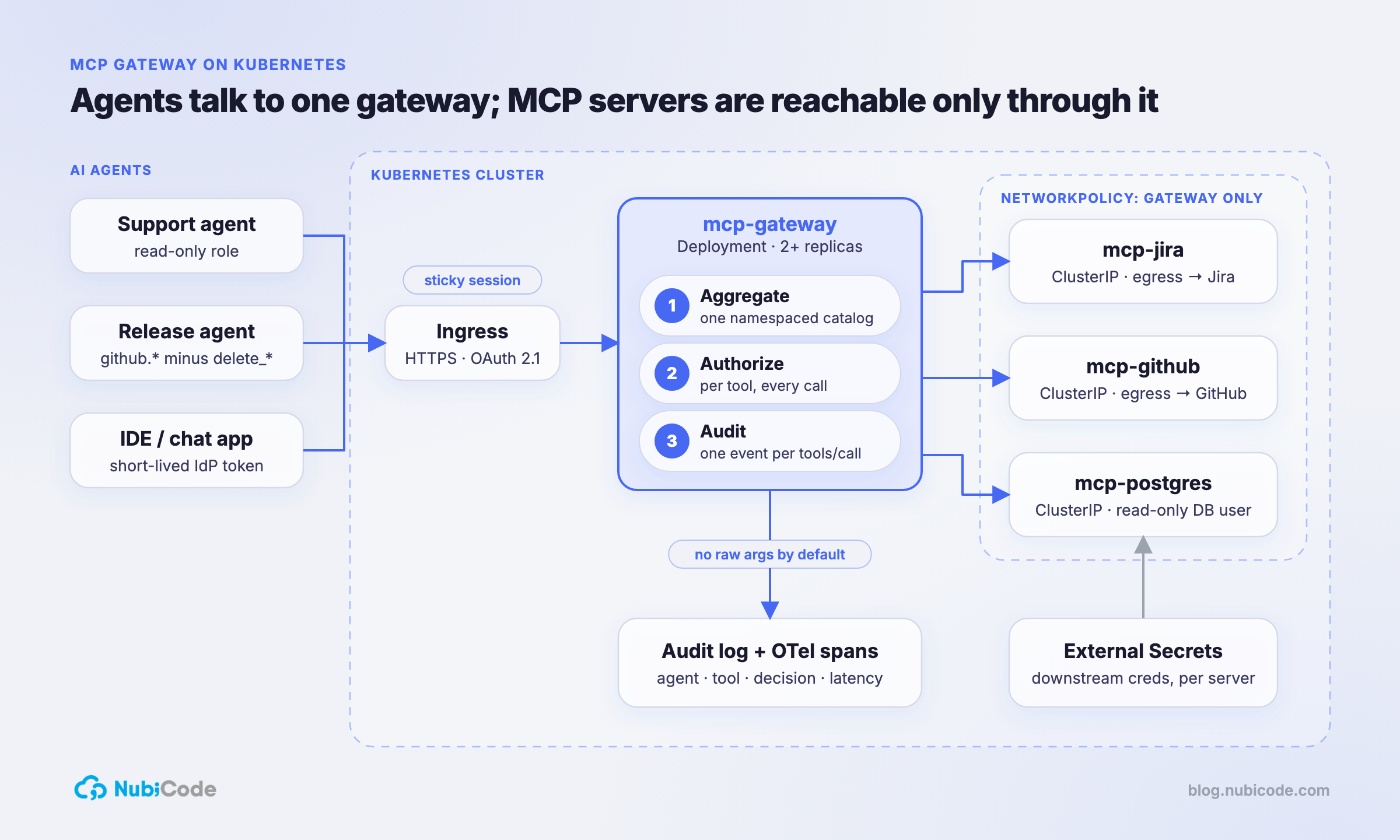
Each MCP server is its own Deployment and ClusterIP Service. None of them are exposed outside the cluster. The gateway is the only thing with an Ingress.
We package the gateway and every server as Helm charts, versioned from CI, and let ArgoCD reconcile them. Adding a tool is a pull request that adds a chart and a route. Removing one is a revert.
Transport: use Streamable HTTP, and mind the session
MCP servers speak either stdio (local processes) or Streamable HTTP. Inside a cluster you want HTTP: servers become normal Services with health checks, autoscaling and network policy.
The detail that bites people: Streamable HTTP can be stateful. The server returns an Mcp-Session-Id header on initialization and the client sends it back on every request. If the gateway runs more than one replica and the session lives in memory, a request that lands on the wrong pod fails.
Two ways out:
- Sticky routing on the session header at the Ingress or service-mesh layer. Quick, but a pod restart still drops sessions.
- Externalize session state (Redis) so any replica can serve any session. More work, and the right answer once agents run long tasks.
We start with sticky routing and move to external state when a workload needs it.
Authentication: keep downstream secrets out of clients
The MCP authorization spec is built on OAuth 2.1. In practice we do this:
- Agents authenticate to the gateway with short-lived tokens from the company identity provider (or workload identity when the agent itself runs in the cluster).
- The gateway maps that identity to a role, not to raw credentials.
- Downstream credentials (a GitHub App key, a read-only database user) live in Kubernetes Secrets synced from a secrets manager via External Secrets, mounted only into the MCP server that needs them.
The result: rotate a GitHub key and no agent config changes. Revoke an agent and it loses every tool at once.
Authorization: per tool, per call
Connection-level auth isn’t enough, because one server usually exposes both harmless and dangerous tools. A GitHub server can list_pull_requests and delete_branch.
The gateway evaluates a policy on every tools/call:
roles:
  support-agent:
    allow:
      - jira.search_issues
      - jira.get_issue
      - github.list_pull_requests
  release-agent:
    allow:
      - github.*
    deny:
      - github.delete_*
Two rules we don’t bend:
- Deny by default. A new tool on a server is invisible until someone adds it to a role.
- Filter the catalog too.
tools/listonly returns what the caller may call. An agent that can’t see a tool won’t try to plan around it.
Guardrails that belong in the gateway
Beyond allow/deny, the gateway is the natural place for:
- Rate limits per identity and per tool, so a looping agent can’t hammer an API.
- Argument validation against the tool’s input schema before the call leaves the gateway.
- Response size caps, because a
SELECT *result fed back into a model is both a cost and a data-exposure problem. - Human-in-the-loop hooks for tools marked destructive: the gateway holds the call and posts an approval request instead of executing.
Observability: log the call, not just the request
HTTP access logs tell you a POST happened. They don’t tell you which tool ran. We emit one structured event per tool call:
{
  "ts": "2026-10-07T13:02:11Z",
  "agent": "release-agent",
  "session": "b1c9…",
  "tool": "github.create_pull_request",
  "decision": "allow",
  "latency_ms": 412,
  "status": "ok",
  "result_bytes": 1830
}
Ship those to whatever you already use, and add OpenTelemetry spans that carry the session ID through gateway → server → downstream API. When someone asks “what did the agent do on Tuesday?”, the answer is a query, not an archaeology project.
We deliberately do not log full arguments and results by default. They can contain customer data. Log hashes and sizes, and turn on full capture per tool only when debugging.
Network policy: the last line
Even with a gateway, assume a server will eventually be misconfigured. Kubernetes NetworkPolicy makes the gateway the only thing allowed to reach MCP servers, and restricts each server’s egress to the one API it wraps:
apiVersion: networking.k8s.io/v1
kind: NetworkPolicy
metadata:
  name: mcp-servers-ingress
spec:
  podSelector:
    matchLabels:
      app.kubernetes.io/component: mcp-server
  policyTypes: [Ingress]
  ingress:
    - from:
        - podSelector:
            matchLabels:
              app.kubernetes.io/name: mcp-gateway
What we’d tell a team starting today
- Put the gateway in before the third tool, not after the tenth. Retrofitting auth onto agents already in use is painful.
- Treat tools like APIs you publish: versioned charts, reviewed in PRs, owned by a team.
- Start with read-only tools in production and add write tools one at a time, each with an explicit role.
- Make the audit log the first dashboard you build. It’s what gets agents approved by security.
We do this for US teams.Senior nearshore engineers, US hours, AWS Partner, Vanta Partner.
Book a 30-minute architecture review