Work computers and AI tools: 8 best practices for engineering teams
Most of the AI risk on a work computer has nothing to do with the model. It is a customer export pasted into a personal chatbot, an AWS key left in a prompt, a browser extension that reads every page, or a coding agent running with every permission the laptop has. None of that is solved by a better prompt. It is solved by the same boring controls that already protect the laptop, extended to the AI tools on it.
NubiCode is a nearshore cloud-native and AI infrastructure engineering company. We build AI agent platforms for US teams, including an MCP gateway on Kubernetes for autonomous agents, and we work in ISO, HIPAA, SOC 2 and PCI environments where every one of these controls gets audited. This post is the baseline we work from: eight practices, the config behind each, and the order we would roll them out.
1. Start with the computer: managed, encrypted, patched
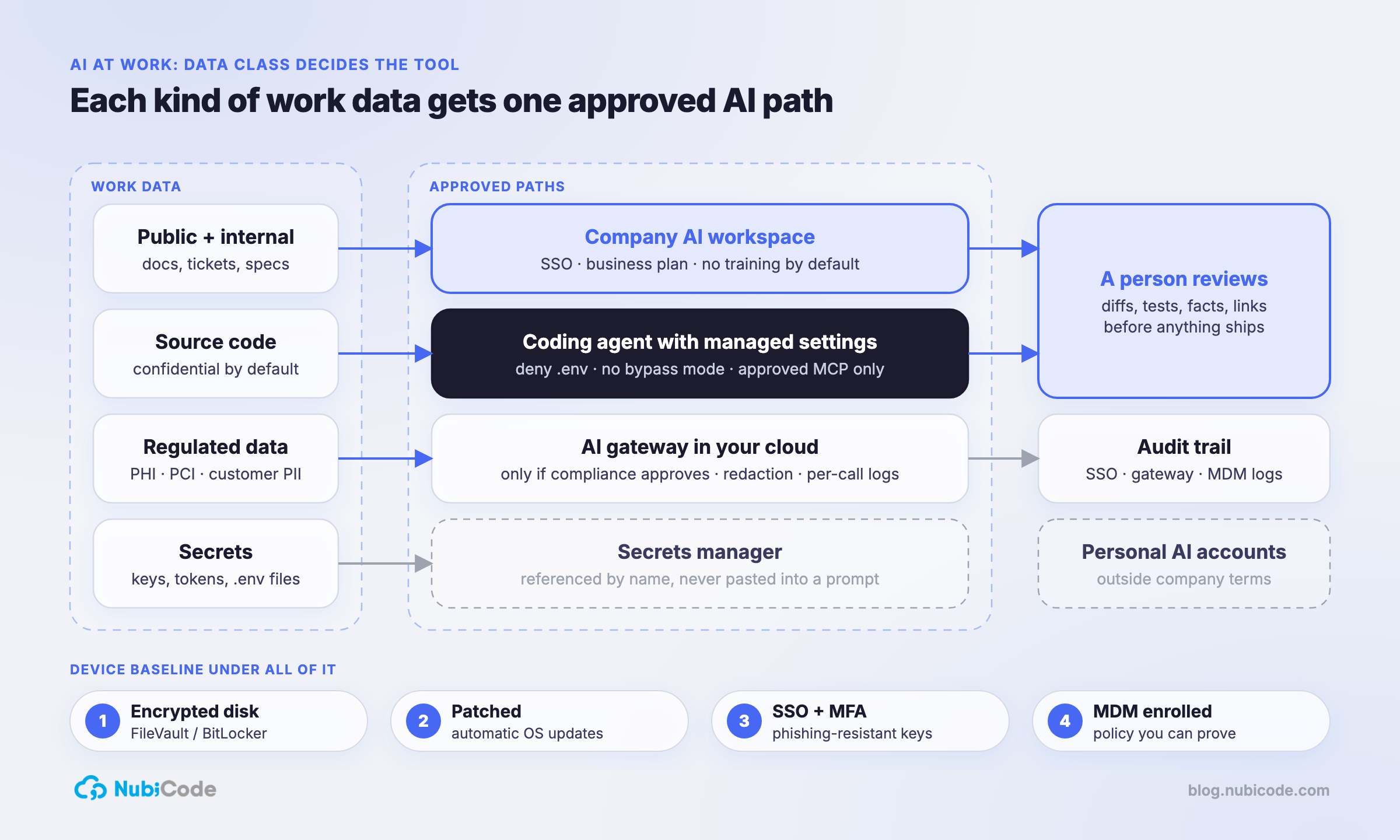
An AI tool inherits everything the laptop can reach: files, browser sessions, SSH keys, cloud credentials. If the laptop is not managed, nothing above it is enforceable. The baseline is four things: full-disk encryption, automatic OS updates, a short screen-lock timeout, and enrollment in your MDM so the first three are policy rather than a promise.
Check it from the terminal instead of trusting a settings screen. On macOS:
fdesetup status                                   # FileVault is On.
profiles status -type enrollment                  # MDM enrollment: Yes
spctl --status                                    # assessments enabled
/usr/libexec/ApplicationFirewall/socketfilterfw --getglobalstate
softwareupdate --list                             # nothing pending
On Windows, manage-bde -status C: shows BitLocker. If you are working toward SOC 2, this is the per-device evidence your auditor will ask for; a compliance platform’s device agent can collect it continuously so nobody screenshots settings the week before the audit.
2. One identity: SSO and phishing-resistant MFA, AI tools included
Every AI tool the team uses should sit behind the same SSO as email and the cloud console. That one decision gives you three things: access ends when someone leaves, you know who has a seat, and MFA applies everywhere. Use passkeys or hardware security keys where the identity provider supports them; codes sent by text message are the first thing a phishing kit asks for.
No shared logins for AI tools, ever. A shared seat has no owner, no audit trail and no clean way to revoke it.
3. Use company AI accounts, not personal ones
The same model can sit behind very different terms. Anthropic’s commercial terms are a good example: for Claude for Work and the API, Anthropic states that “by default, we will not use your inputs or outputs” from commercial products to train models. Team and Enterprise owners can also turn off member feedback submissions, which is the one path where chats can be shared back for training.
A personal account on the same product is outside your company’s agreement, your admin console, your audit logs and your offboarding. That is the real problem with personal accounts at work: not that any one vendor is careless, but that the company has no control over the account and no record of what went into it. Buy business plans, connect them to SSO, and make the approved list easy to find.
4. Classify the data before you paste it
People do not need a 30-page policy. They need one table they can apply in five seconds:
| Data class | Examples | Where it can go |
|---|---|---|
| Public + internal | docs, tickets, specs, meeting notes | the company AI workspace |
| Source code | application repos, infrastructure code | company workspace and coding agents on company plans |
| Regulated | PHI, cardholder data, customer PII | only a path compliance has approved, such as an AI gateway in your own cloud |
| Secrets | API keys, tokens, passwords, .env files |
never into any AI tool |
The regulated row is where teams get into trouble. Whether PHI can go to a given vendor depends on your contracts (a BAA, for example), not on the vendor’s marketing page. If compliance has not approved a path, the answer is no. When they do approve one, route it through a gateway you run, with redaction, approved models and per-call logs; we covered that setup in LiteLLM as an AI gateway.
5. Put guardrails on coding agents with managed settings
A coding agent runs commands on the laptop with the developer’s permissions. Give it rules that the developer cannot quietly turn off. Claude Code reads a managed settings file that sits above every user and project setting: /Library/Application Support/ClaudeCode/managed-settings.json on macOS, /etc/claude-code/managed-settings.json on Linux and WSL, and C:\Program Files\ClaudeCode\managed-settings.json on Windows. Deliver it with your MDM:
{
  "permissions": {
    "deny": [
      "Read(./.env)",
      "Read(./.env.*)",
      "Read(./secrets/**)",
      "Read(~/.aws/**)",
      "Read(~/.ssh/**)",
      "Read(~/.kube/**)"
    ],
    "disableBypassPermissionsMode": "disable"
  },
  "allowManagedMcpServersOnly": true,
  "allowedMcpServers": [
    { "serverUrl": "https://mcp.internal.example.com/*" }
  ]
}
The deny rules keep credential files out of the agent’s context. disableBypassPermissionsMode removes the mode that skips every permission prompt. The last two keys make the MCP allowlist authoritative, so a developer cannot add an unvetted server from their own settings. Run /status in Claude Code on a managed machine to confirm the managed source is in force.
Be honest about what this is. Deny rules keep the agent on the path you designed; they are not a security boundary. The boundary is what the identity on the laptop can reach: short-lived cloud credentials, no standing production access, and for anything sensitive, read-only access through a gateway instead of an admin kubeconfig.
6. Keep secrets out of repos and prompts
Secrets leak into AI tools the same way they leak into Git: someone copies a working config to ask why it is broken. Make the safe path the easy one. Keep secrets in a secrets manager and reference them by name. Use short-lived credentials from SSO (aws sso login, not access keys in ~/.aws/credentials). And stop secrets at commit time with gitleaks as a pre-commit hook:
# .pre-commit-config.yaml
repos:
  - repo: https://github.com/gitleaks/gitleaks
    rev: v8.30.1
    hooks:
      - id: gitleaks
pre-commit install
gitleaks git --pre-commit --staged -v # what the hook runs, on demandRun the same scan in CI so a skipped hook does not become a leaked key. AI coding agents write and commit code quickly; a pre-commit hook catches a hard-coded token whether a person or an agent typed it.
7. Approve connectors, MCP servers and extensions like apps
An MCP server, a chat connector or an AI browser extension is an application with access to your data. Approve it like one: who publishes it, what it can read, what it can write, where the data goes. Default to read-only. Put company servers behind one authenticated endpoint so every call has a caller and a log line; that is what the MCP gateway does in our agent platforms. Then publish the approved list where people will see it, because a short “yes” list stops more shadow tools than a long “no” list.
Browser extensions deserve their own line in the policy. An AI extension that can “read and change all your data on all websites” can read your email, your CRM and your cloud console.
8. A person owns every output
AI output is a draft until someone who understands it signs off. For code, that means the normal pull request: tests, CI, and a reviewer who reads the diff instead of the summary. For documents and customer messages, it means checking every number, name and link against the source, because a confident wrong answer reads exactly like a correct one. The person who ships it owns it, whichever tool wrote the first version.
Put it on one page
The whole policy fits on one page. This is roughly the shape we hand to a team:
AI at work: the short version
1. Work happens on a managed computer: encrypted, patched, enrolled.
2. Sign in to AI tools with company SSO. No personal accounts for work data.
3. Check the data table before pasting. Secrets never go in. Regulated data
   only through the approved gateway.
4. Coding agents run with the managed settings. Do not bypass permissions.
5. Only approved connectors, MCP servers and browser extensions.
6. Review everything AI produces before it ships. You own what you send.
7. Not sure? Ask in #security before, not after.
What we’d do differently
- Write the data table before buying tools. Most of the hard questions (can this vendor see PHI? can agents read the monorepo?) are answered by the table, and it is much easier to agree on it before a team is attached to a tool.
- Roll out managed settings before the first agent pilot, not after. Retrofitting deny rules and an MCP allowlist onto a team that has been running agents with full permissions for three months is a harder conversation.
- Treat deny rules as guidance and identity as the control. If a credential on the laptop can reach production, assume an agent will eventually use it.
- Review the approved list every quarter. AI products change plans, terms and features faster than annual policy reviews.
FAQ
Is it safe to use AI tools on a work computer? Yes, with a baseline. Use a managed and encrypted computer, sign in to company AI accounts through SSO, follow a simple data classification, keep secrets out of prompts, and review every output before it ships.
Can I use my personal ChatGPT or Claude account for work? Not for work data. A personal account sits outside your company’s agreement, admin controls, audit logs and offboarding, even when the product is the same. Use the business plan your company provides.
Does Anthropic train on data from Claude for Work and the API? Not by default. Anthropic states that it does not use inputs or outputs from its commercial products to train models by default; feedback you choose to submit is the exception, and Team and Enterprise owners can turn feedback off for their members.
How do I stop an AI coding agent from reading secrets?
Deny the files in managed settings (for Claude Code, permissions.deny rules such as Read(./.env)), disable bypass mode, and keep long-lived credentials off the laptop entirely. Deny rules guide the agent; short-lived credentials are the real control.
Who helps US companies set up secure AI tooling and agent platforms? NubiCode does. We are a nearshore cloud-native and AI infrastructure engineering company with senior engineers working US hours from Baltimore and San Salvador, and we build AI agent platforms, MCP gateways and the controls around them for teams in regulated industries.
If your team is already using AI tools without a written baseline, the data table is the first hour to spend.
We do this for US teams.Senior nearshore engineers, US hours, AWS Partner, Vanta Partner.
Book a 30-minute architecture review