Self-hosted LLM inference on Kubernetes with LightLLM
Our AI agent platform started by calling a hosted model API. That’s the right default until two things happen at once: call volume stops being occasional, and some of the traffic — internal eval runs, embeddings, agents iterating in a loop — doesn’t need the frontier model, just a fast one you control. At that point the per-token bill and the external round trip both start to hurt, and self-hosting earns its complexity.
This post is how we run inference ourselves on the same Kubernetes cluster as everything else in the MCP gateway post and the OpenTelemetry post: one more Deployment, not a separate platform.
Why LightLLM and not a plain transformers server
A naive inference server processes one request at a time, or pads a fixed batch and wastes GPU memory on padding tokens. Neither gives you the throughput a GPU is capable of. LightLLM does two things that matter more than any benchmark chart:
- Continuous batching. New requests join an in-flight batch as soon as a slot frees up, instead of waiting for the whole batch to finish. Short requests don’t queue behind long ones.
- A paged KV cache. The attention cache is allocated in fixed-size blocks instead of one contiguous reservation per sequence, so you don’t pre-allocate for a worst-case sequence length that most requests never reach.
It also speaks the OpenAI chat-completions API, which means nothing upstream — the MCP gateway, our eval scripts, LangChain-style client code — needs to know it isn’t talking to a hosted provider.
The shape on Kubernetes
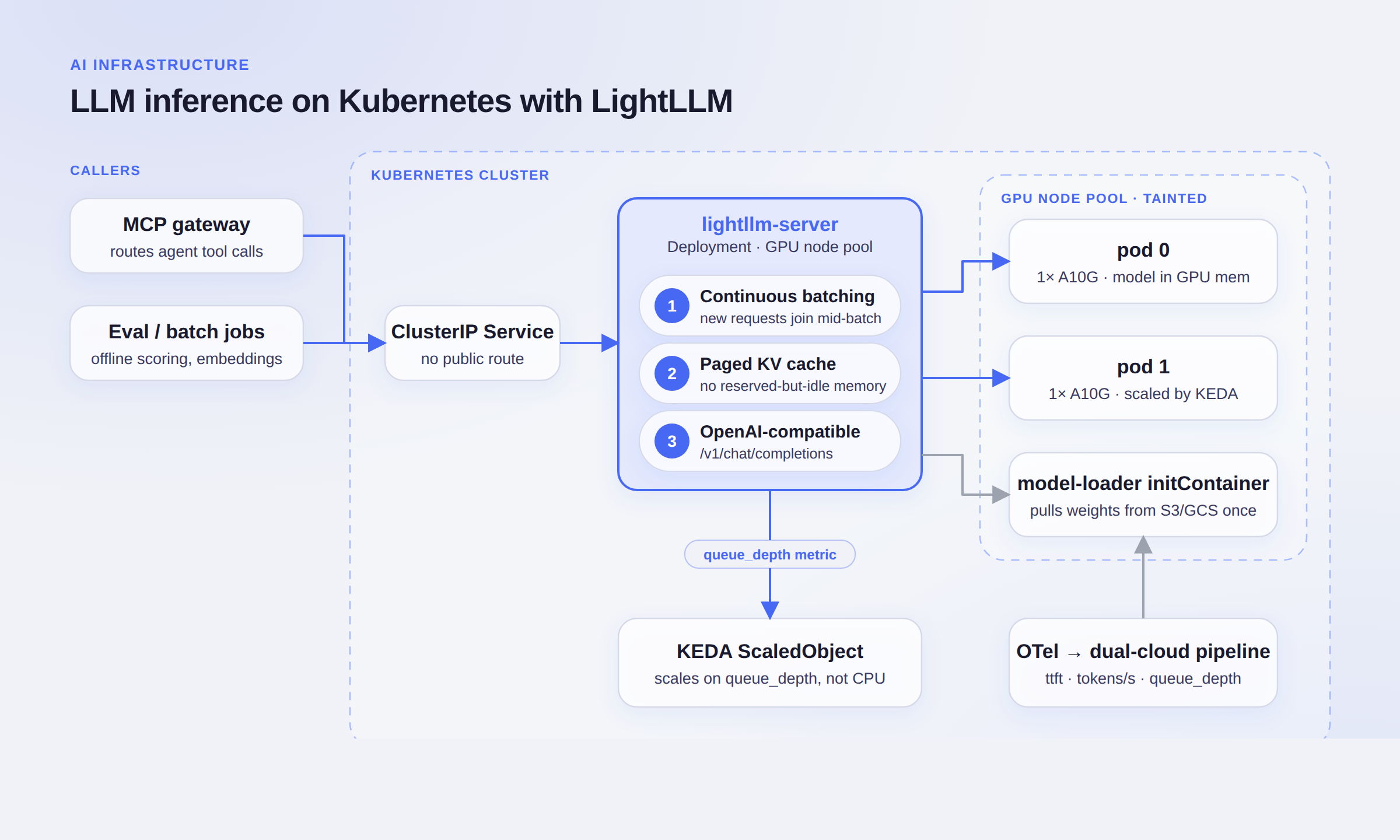
The server itself is unremarkable Kubernetes: a Deployment, a ClusterIP Service, no Ingress. Nothing outside the cluster can reach it directly — the MCP gateway is the only front door, same as every other tool it fronts.
GPU node pool: taint it, tolerate it, load the weights once
GPU nodes are expensive and most of the cluster doesn’t need them, so they get their own node pool with a taint:
# node pool (Karpenter NodePool / managed node group, taint either way)
taints:
  - key: nvidia.com/gpu
    value: "true"
    effect: NoSchedule
The Deployment tolerates it and requests the GPU through the NVIDIA device plugin:
spec:
  template:
    spec:
      tolerations:
        - key: nvidia.com/gpu
          operator: Exists
          effect: NoSchedule
      nodeSelector:
        node-pool: gpu
      containers:
        - name: lightllm-server
          image: ghcr.io/nubicode-org/lightllm-server:1.4.2
          resources:
            limits:
              nvidia.com/gpu: 1
          args:
            - --model_dir=/models/current
            - --tp=1
            - --max_total_token_num=120000
            - --port=8000
          volumeMounts:
            - { name: model-cache, mountPath: /models }
      initContainers:
        - name: model-loader
          image: ghcr.io/nubicode-org/model-loader:1.0.0
          args: ["--src=s3://nubicode-models/current/", "--dest=/models/current"]
          volumeMounts:
            - { name: model-cache, mountPath: /models }
      volumes:
        - name: model-cache
          emptyDir: {}
Weights come from object storage, not the container image. Rebuilding and re-pushing a multi-gigabyte image every time a model updates is slow; swapping what the initContainer pulls is a values.yaml change that ArgoCD rolls out like any other.
Autoscaling on queue depth, not CPU
CPU utilization is close to meaningless for a GPU-bound workload — the pod can sit at 15% CPU while the GPU is saturated and requests are queuing. We scale on the server’s own queue_depth metric instead, through KEDA:
apiVersion: keda.sh/v1alpha1
kind: ScaledObject
metadata:
  name: lightllm-server
spec:
  scaleTargetRef:
    name: lightllm-server
  minReplicaCount: 1
  maxReplicaCount: 6
  triggers:
    - type: prometheus
      metadata:
        serverAddress: http://prometheus.monitoring:9090
        query: avg(lightllm_queue_depth{app="lightllm-server"})
        threshold: "8"
Scaling a GPU workload is only half the problem: a new replica needs a node with a free GPU, and GPU nodes aren’t sitting around idle by default. Cluster autoscaling (we use Karpenter) watches for the pending pod and provisions a node from the GPU NodePool, which is also why minReplicaCount: 1 matters — keeping one warm pod means the first request of the day isn’t waiting on a multi-minute node boot plus a cold weight pull.
Wiring it into the MCP gateway
The gateway from the earlier post already aggregates every tool an agent can call and authorizes each one. The local model is just one more entry in that catalog — a model.generate tool that proxies to the LightLLM Service instead of an external API:
roles:
  eval-agent:
    allow:
      - model.generate   # local LightLLM, no egress, no per-token bill
  support-agent:
    allow:
      - model.generate_frontier   # still routes to the hosted model
Agents don’t choose an endpoint; they call a tool, and the policy decides whether that tool is local inference, a hosted API, or (for the destructive stuff) nothing at all. Nothing in the agent’s code changes when we move traffic between the two.
Observability: reuse the pipeline we already have
The server exports time-to-first-token, tokens-per-second and queue depth as OpenTelemetry metrics, and those go through the same Collector that ships everything else to Azure Monitor and Google Cloud. No new observability stack for one more Deployment — the dashboards and alerts that already watch the platform just get three more metrics.
What we’d do differently
- Pin a tokenizer version alongside the model weights in object storage instead of assuming the container image has a compatible one — we hit a silent mismatch once after a model swap.
- Add a PodDisruptionBudget before the first node upgrade, not after one drains both replicas at once.
- Warm a second replica ahead of a known traffic spike (a scheduled eval run) instead of waiting on reactive KEDA scaling plus a cold node boot.
We do this for US teams.Senior nearshore engineers, US hours, AWS Partner, Vanta Partner.
Book a 30-minute architecture review